Student Teachers, Podcast, Yoga, and “Meet The Teacher”

First off, congratulations to the student teachers who just graduated from college and second congratulations to those of you who will be starting your student teaching this winter. I’ve see lots of student teachers asking about introductions to students and parents.

I wanted to show you a couple examples of my letter to students and parents and give you some advice.

  1. Don’t be a perfectionist. This is advice that was passed down to me from my student teaching advisor. Be open to change and be positive and open-minded. Be adventurous and risk-taking, and do what you know is best and right for students… especially when you are a teacher.
  2. Be yourself. I was told this advice on Friday when meeting with a behavioral psychologist in my classroom that observed my kiddos. No matter what, your behavior management and classroom have to be your own and have to reflect you. I know when I am a very stressed teacher, I am the worst teacher. You will have tons of work during student teaching, but try to find something to help you de-stress, like yoga, shopping, going out with the girls/guys, or go to the gym.
  3. Listen to podcast. The Truth For Teachers is a great Podcast and so is the 10 minute teacher by Vicki Davis (She’s someone you should follow). “Finally Free: The Teacher Toolkit for Conquering Anxiety, Overwhelm, and the Pressure to do More” is a great resource for when you are a teacher. It’s found at https://www.teacherlifestylelab.com/p/finally-free. There is also free yoga for teachers and the classroom. Yoga with Adriene is my favorite. We use it in my classroom, and I use it at home! She is amazing!


 4. Have fun and listen to your cooperating teachers. They have great advice! You will rock it!

Here is a letter to parents from a student teacher example I created. https://www.teacherspayteachers.com/Product/Example-Letter-to-Parents-from-Student-Teacher-2016569

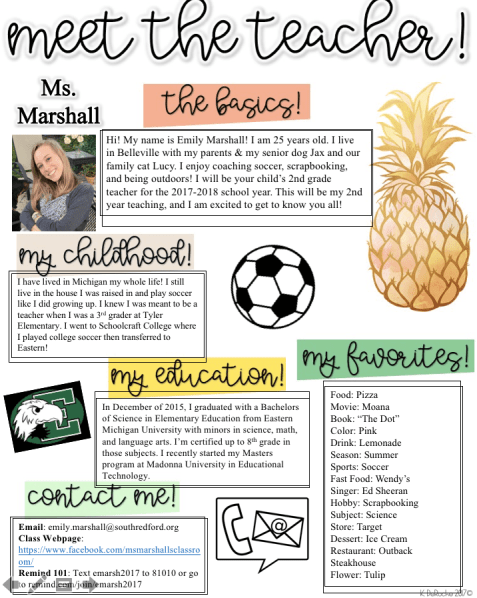
Kristi DeRoche has cute “Meet the Teacher” outlines online. Many are found at https://www.teacherspayteachers.com/Store/Kristi-Deroche. Thank’s Kristi for sharing your ideas with the world!

Here’s mine from using her outline:
Screen Shot 2017-12-16 at 7.10.40 PM


Cooperative Learning

On my last post, I showed how our class uses Padlet to work in groups,  but there are other ways we work cooperatively in our classroom. One thing this year that was implemented was a new reading program called Success For All, and it’s very similar to guided reading groups, except instead of small groups, everyone is at the same level in one room. One of the challenges is differentiating for developmentally appropriate levels because I have 4th, 3rd, and 2nd graders all in one room, but I’ve found some ways to help all the students with collaboration that work very well for collaboration and management. The ideas below can be implemented in any subject and/or with programs like SFA or like Kagan structures.

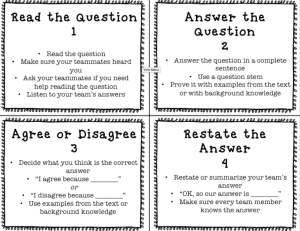
One thing we do is when we answer questions, we use role cards. Ones we use in our classroom are FREE by Teaching Expedition and located at https://www.teacherspayteachers.com/Product/Team-Talk-Role-Cards-3176289.

Screen Shot 2017-12-14 at 7.14.17 PM.png

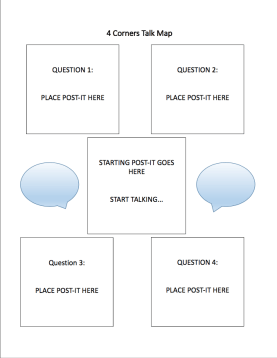
The next thing we do is use a talk map to answer the questions. Role cards rotate every question. The question students work on gets placed in the middle, and the teacher can see what question the students are on. When they are done with one question, they work on the next.

The sheet for questions we use is located on my teacherspayteachers page, and it’s also FREE! It’s at https://www.teacherspayteachers.com/Product/Discussion-Talk-Map-3540265.

Screen Shot 2017-12-14 at 7.11.00 PM


The Possibilities of Padlet

I’ve included 3 Padlet examples in this blog that I have created and shared to help other teachers come up with ideas to use Padlet. We’ve always used it for our Newsletter (if you don’t want to pay for SMORE). I started thinking of other ways to use it, and here are a few ways I have come up with!

First, I wanted to share what we have been doing in math using Padlet! If you have access to a computer lab or Chromebook, I recommend doing this with your students. It allows them to be creative, problem solvers, designers, and more. We worked in groups to create a classroom math Padlet. Although I took their videos down for the internet, they had to make a video for each problem they created. I left my videos on there for you to see. They had to write their problem (I edited them for you guys ;)) and then solve others’ problems.

Here’s the Padlet: https://padlet.com/emarshall321/5fco310kdjf9

Here’s how it worked:

Day 1: They came up with a group name (I did not tell them to do this; they all decided they wanted to do this on their own). Next, they created a problem with their group. The decided to use their teammates names in the problems, but I changed these also for privacy on the internet. After they created their problem, they made a video of themselves reading the problem. Since they all want to be YouTubers why not use that to your advantage? When they finished their video and were waiting for others, they could create more problems.

*My Padlet was password protected AND the student work had to be approved by me first before they would pop up on the Padlet.

Day 2: It was a centers day, so at my center, we solved the problems together. I was able to pick which problems I wanted each group to solve, so my lowest group, I could pick an easy, non-regrouping problem a group created to practice. For my highest group, I could pick challenging problems other students created for them to work on or was able to get through more problems and a variety of problems.

What’s Next?

Students will video themselves solving a problem. They’ll tell their answer and explain their answer as an exit ticket, and I will show some videos to the class to show different ways of solving a problem AND what it’s like to use words to share how you solve a problem. We will use this to practice agreeing or disagreeing respectfully.

Another way to use Padlet is for students to create a graphic organizer to remember topics or for you as the teacher to create organizers to explain information to students.

Here’s a Padlet for Parts of a Seed: https://padlet.com/emarshall321/y0vag5scnfe8

Here’s a KWL Padlet: https://padlet.com/emarshall321/kaqg14uvth37