Teaching with Tech

It’s my second year teaching, so with that, I’ve been trying to incorporate a lot more technology in the classroom and help others integrate it also. This year we started using a new social emotional curriculum. I make videos weekly of the cooperative challenges our whole school shares. I use different students from different classrooms to create a cooperative culture throughout our school.

Using iMovie, I am able to easily design trailers and movies to share with students, classrooms, and parents. This week I presented two of my favorites to the board of education (see below).

One thing to remember when you use tech is that students almost always have good ideas, and they have been using the technology since they were young. However, just because they started at a young age doesn’t mean they understand safety on the internet and everything that comes along with computers, so you still have to model, tell them how to be safe, and help them practice!

The videos below show students’ own ideas and design thinking. They are creative and compassionate individuals!


Here is another one:


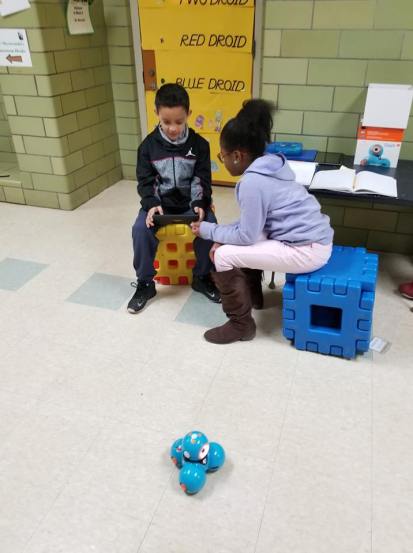
Also, today we worked on our Passion Projects. If you haven’t read my last blog about them, you should! The kids absolutely love doing them, and they are so much fun. I have three students researching different aspects about robots, and today our tech coach media specialist was able to stop by and show my kids how to code a robot. This is my favorite time of year. The students really grow and that growth becomes so apparent, especially as we start to do a lot of projects! This week they have learned about robots, volcanos, dance, dinosaurs, lotion, phones, football, and more! They’ve learned how to use google slides and google classroom, along with search engines that are kid-friendly and Symbaloo. I really am so proud of them!!
29570326_1908132646164816_8001576856328213758_n


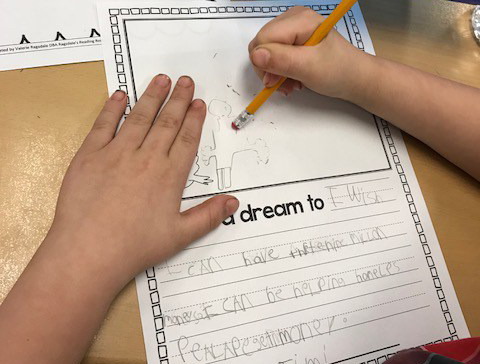
I Have a Dream

With all the school threats lately and March for Our Lives, I wanted to share what we did for MLK day this year. I think we all have a dream to live in peace and not have our students and children be surrounded by hatred. We want our students to have dreams and goals and to be able to live out those dreams and goals. We want them to feel safe to go to school and take risks and learn.

I’m 25. I want to feel safe going to work every day, so I can follow my dreams and ambitions as I grow as an educator and person. Teachers who are parents want to go to work knowing they’ll return home to their own children at the end of the day, and parents of students want to be able to send their students to school knowing they’ll come home safely at the end of each day.

Although there have been threats all around at the schools in the communities where I live and work, I still remain positive that there is good in the world, and that teachers and students do make a difference in the world. I know the teachers and students where I work make a difference every day, and if we continue have goals for the future that make it an even better place, anything is possible.

Here are some of my students’ dreams and goals and the worksheets we used, and if they follow them, I think our future looks promising.

Some of my students’ dreams (edited for spelling):

  1. Clean up the whole world.
  2. Feed the homeless and give them homes.
  3. To be a vet.
  4. To make art and put it in a museum.
  5. Have a million dollars to help homeless people get money.

img_3369.jpg


Monkey Business: Classroom Themes

Teaching second grade, I love decorating my classroom to create a culture of learning and fun. This year’s theme is jungle monkeys. Each year we have to create a class name, and my students voted to make it Ms. Marshall’s Monkeys… very fitting. Each year before open house, I decorate my door, label my room so parents can find it, and set up my rainbow table with lots of information.

For my open house table, I have a newsletter introducing myself, you can see it in my other post, jitter glitter, a sign-in sheet, a volunteer form, and a supply list with apples that have other supplies on them parents can grab if they’d like to donate something to the class. I also have labels for each item.

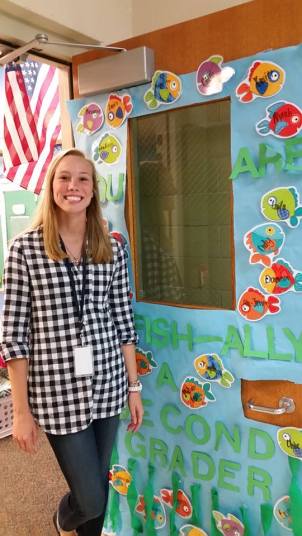
Here’s what my door looked like my first year teaching. I used tissue for seaweed and had an underwater theme. My students love finding their names on my door.

14233052_10210375529250724_2916057267477088221_n.jpg

I’ve seen superhero, emoji, comic, zoo animal, sports themes and more for the classroom. Looking ahead to next year, I was thinking “Second Grade is a Ball,” and doing sports. What themes have you seen or used in your classrooms?


Classroom Libraries For Teachers

Organizing a classroom library is a daunting task, especially when you are a new teacher trying to figure out how you want it, or an experienced teacher wanting to redo your library or just put books back in their right places. There are so many ways to organize classroom libraries… by topic, by series, by level, etc. Then once it’s organized, there’s the question “Do the kids put their own books back into the library or do I make it a job and have them put their books in a bin?” Also, you need a book hospital for those ripped books, and what about those books you made as a class, and the books you use for lessons???? Finally, you also need to label your books, and there are tons of ways to do that too.  It’s kind of overwhelming, so I thought I’d share what my classroom looks like for those new teachers or teachers looking to organize their libraries in a different way. Once you read how I organize mine, visit https://www.ideasforlearners.com/blog/classroom-library-organization-someday-it-will-all-be-beautiful for more classroom library ideas!

My library is organized by topic and series. The kids have to use the five finger rule and rules for finding just right books, instead of books having levels on them. Libraries don’t always have books that say what level they are on them, and when you’re an adult, they definitely don’t level them at a bookstore, so I wanted my library to be realistic, so they get the practice they need for when they need to pick books out outside of the classroom.


I ordered my little bins from Dollar Tree.  My large bins are also from there. Teacher hint: ALWAYS USE THE DOLLAR STORE. I also get my turn-in bins there. I was worried about how Dollar Tree bins would hold up, but they’re going on year 2 for a dollar, and still good! I keep my glue in these bins and here are my table bins. It’s like the Target Dollar Spot, and I always go there too!


Lastly, I got my labels from Jo’Ann Fabrics. They are on clearance right now, so I think they may be getting rid of them. They have a ton of choices to choose from in terms of labels that aren’t going away. The labels I use for my books are just return address labels.  Target also sells a little bigger return address labels for symbols, but I fit mine on plain ones. Either would work!  Each label on the bins and the books has a matching picture. My books also say Ms. Marshall on the label and the matching bin word. For instance, all animal books have a picture of a frog and have Ms. Marshall and Animals typed on them.  The typed part also matches the color of the bin circle. For example, Ms. Marshall and Biographies is written in orange on the book labels.

Finally, I keep the books I use for lessons and the books in my library for kids separate. Last year, I did not do this. I kept them all together, and it worked out that way too. This year, I decided to keep the books I need behind my desk, just because I don’t have to search for them the day before, and I let kids take books home from my library this year; they just need to ask me. I almost always have doubles anyways of the books we use for lessons and books they can read.

Comment below with how you organize your library!


Passion Projects

This past week we have started our passion projects, which are inspired by Genius Hour.

For our project, we are using Nearpod and Flipgrid, and our entire Passion Project unit can be found at https://share.nearpod.com/ejkbuxjW2K.

I just discovered Nearpod, and I absolutely love it. Not only can you create lessons on it, but there are a ton already made that you can use for lessons.

Feel free to use it in your own classroom.

Our topics and what we are researching can be found at Flipgrid using the code 1152d0.

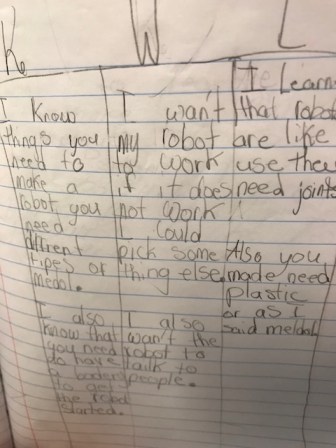
This week students developed their topics, created KWL charts with what they already know and want to know about their topics and created a goal for themselves. Some even began their research and filling in their learned section on their KWL’s. Each student did their own KWL. In the next lesson we will be creating a class rubric together for scoring of the projects.

IMG_3859