Staying Afloat With Virtual Learning

Well, I’m sure I’m in the same boat as every teacher reading this. We are all sitting at home on our couches, in our beds, at our kitchen tables, or playing with our pets or children during times we would normally be teaching in a normal classroom during a normal time. Except, it’s not a normal time. We are all experiencing different things right now, but we are all in this together!

I figured, no better time to start up my blog again. I’m not going to make it anything fancy today, just some basic necessities for teaching online or for some resources, so here are some links to work I’ve created. Feel free to use with your students, use as examples to unleash your creativity to create your own lessons, or to use the tutorials to help you begin to teach online or with technology, if you never have before!

While you explore the resources, though, remember, YOU DON’T HAVE TO DO IT ALL! When I was getting my Master’s in Ed Tech, we had a motto… learn 1-2 things a year and get really good at those! We may need a few more resources up our sleeves at this time, but start with 1! Get good a google slides and share those or screen shots of those to your parents, or get good at screen casting and screencast your lessons, or get good at using Flipgrid or SeeSaw and start with those! You can do it!

Screencastify and Whiteboard…Screencastify is a great way to record your screen, and you can use online whiteboards to make it even more purposeful!

Math Lessons Using Screencasting and Google Slides…Google slides is a powerful learning tool to use with students. You can make them basic and share them out, you can make them interactive where students can click through on different items to explore different resources, or you can make them have sound and videos and play them in your classrooms! Here is an example of how to use them with virtual classrooms!


FlipGrid…I’ll be honest, I made this video back in 2018. They’ve added some really cool QR code features and AR since then, but creating an account, it being completely free, and having students create videos hasn’t changed! This is one of my favorite resources to use, and it’s a favorite among students as well!

Classroom Culture!

Creating a classroom culture of kindness and respect has always been important, but in today’s classroom it’s more important than ever. Kids need to feel included. Kids need to feel heard. Kids need to feel safe. With the rise of social-emotional learning or SEL in classrooms, here are some things you can do in your own classroom to build a classroom culture of kindness and acceptance.

  1. Kindness Catcher
  2. Literature
  3. Activities
  4. Morning Meetings

Kindness Catcher

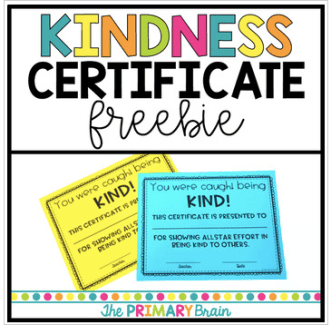
I have a Kindness Catcher in my classroom. There are little sheets of paper that have a to: and from: and large blank space on them next to a bin that is labeled “Kindness Catcher”. Whens students catch someone being kind, they can fill out a sheet by writing who was kind, their own name, and what the kind action was. We share these when the bin fills up and students receive certificates from me for being put in the Kindness Catcher.

I use these free certificates by The Primary Brain found at https://www.teacherspayteachers.com/Product/Kindness-Certificate-Award-FREEBIE-3830191
Screen Shot 2019-02-06 at 2.45.28 PM.png


Some other cute Kindness Certificates by Bitten by the Teaching Bug can be found at https://www.teacherspayteachers.com/Product/Random-Acts-of-Kindness-Certificates-Editable-3000011?gclid=EAIaIQobChMI-e6ble6n4AIVDIlpCh24XwrvEAQYAiABEgIi4fD_BwE for $3.50.

Literature

There’s not much picture books don’t cover in terms of kindness, anti-bullying, and respect. My favorite books to teach this are Spaghetti on a Hot Dog bun and I Am Human:  A Book of Empathy.

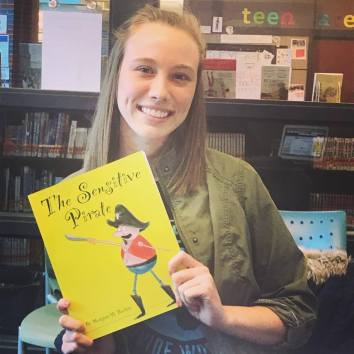
I recently received and reviewed the book “The Sensitive Pirate”. It’s an amazing book about a mean pirate who wants to be his funny, nice self. Using illustrations, strong vocabulary, rhyming, and humor, the author Morgan W. Richie sends a message to all her readers that happiness happens when you are true to yourself!

You can purchase the book at https://www.amazon.com/Sensitive-Pirate-Morgan-W-Richie/dp/0692066950.
50818551_10218280546831223_5187820181417623552_n.jpg

Activities

Activities that share the message of being yourself, anti-bullying, and being kind to each other can be found in most classrooms. If you are looking for some new ideas to share with your students, here are a few!

The Toothpaste Activity

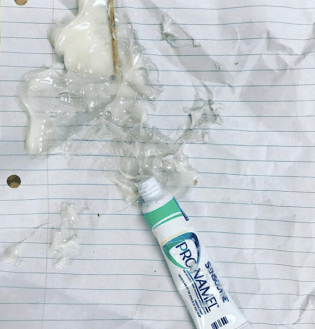
The toothpaste activity that is found at http://www.mrsoknows.com/2013/07/did-i-just-leave-dollar-tree-with-that.html?m=1  teaches students about the importance of thinking before speaking. The toothpaste represents words and when students go to put it all back into the tube, they can’t. This represents how you can’t take back the hurtful things you say to someone. It was a hit with my 5th graders at the beginning of the year!
Screen Shot 2019-02-06 at 2.52.34 PM.png

The Crumbled Paper Activity

I did this activity back in one of my college classes. We decorated our own plain piece of computer paper while we sat in a circle. We then passed it to the next person. Each person had our paper for about 30 seconds to a minute. They could draw on it, crumble it, stomp on it, but they couldn’t rip it. By the time it returned to us, it was a mess! We were then told to straighten it out, make the way it was when we started. We obviously couldn’t! It sent a message of how our actions can effect someone permanently. How you treat a person (in this case the paper) can’t always be undone, so be aware how your actions effect people and have empathy toward others!

A variation of this activity can be found at https://ripplekindness.org/crumpled-paper-bullying-exercise/.

Morning Meetings

Morning meetings can be a great time to communicate to students the importance of kindness and respect. They also build student ownership and a classroom culture of respect. We even were able to do the tooth paste activity together during a morning meeting. When they are done daily with routine, students can run them. We have expectations for ours… you sit criss-cross, you look at the speaker, and speak only when it’s your turn (in our room you have the magic ball). We have a chant we say every morning meeting to remember the expectations. Then each day has a different activity. Some days are questions (these could be about hygiene, social media, kindness, just for fun topics, etc), some days are sharing about our weekends, and some days are social stories. You decide what your class needs to work on and adapt the meetings to meet those needs.

Have other ideas for what students can do on snow days? Share them with me on Twitter @Ms.Marshall_DES, on my Facebook Page @teachstation, on Instagram @Teacher_Station, or in the comments below.

Kindest Regards,

Emily
Learning with Technology on Snow Days!

These past two weeks in Michigan have been snowy and icy to say the least! With closings all last week and an ice day today, teachers have been taking advantage of using technology to reach their students at home to continue learning! Here are a few ways to reach your students and a some ideas to share to parents for those days off!

Communication

Use Class Dojo to communicate with parents when snow days are in affect and to share out ideas of activities for students to do on their days off. With older students, you can also use Schoology or Google Classroom to reach students when school is closed. Lastly, a classroom Facebook page or Twitter can be used to reach families to continue the learning when school is not in session. Just make sure what is okay to have in your districts as some ban Facebook or don’t have student emails for LMS systems or virtual classrooms like Google Classroom.

Ideas

A co-worker of mine @Dolezal_DES on twitter created the Snow/Cold Day Challenges above for her first grade students! Students shared their pictures with her and you can see them on her Twitter, so pay her a visit! You can also use apps such as Flipgrid with students to have students share their work outside of the school day like the Snow Day Challenges for 5th grade students.

Digital Divide

As always, remember, some students may not have access to the Internet and this leads to problems with the digital divide, so the activities are for fun and not mandatory. Hopefully students and parents will be motivated to do a few on students’ days off!

Have other ideas for what students can do on snow days? Share them with me on Twitter @Ms.Marshall_DES, on my Facebook Page @teachstation, on Instagram @Teacher_Station, or in the comments below.

Enjoy,

Emily


Building Content and Your PLN!

Hi Everyone! I’ve been MIA for quite some time. If you want to catch up on what I’ve been working on, make sure to follow me on Twitter @MsMarshall_DES and on Instagram @teacher_station. I switched grades and districts this year. I also am in my last semester of grad school! Life has been crazy, but I’m finally back!

This month’s goal for me is to grow my PLN. If you’re not sure what a PLN is, it’s your learning network of other teachers and principals and educators who you can chat with, bounce ideas off of, and learn from! It’s a powerful thing to have!

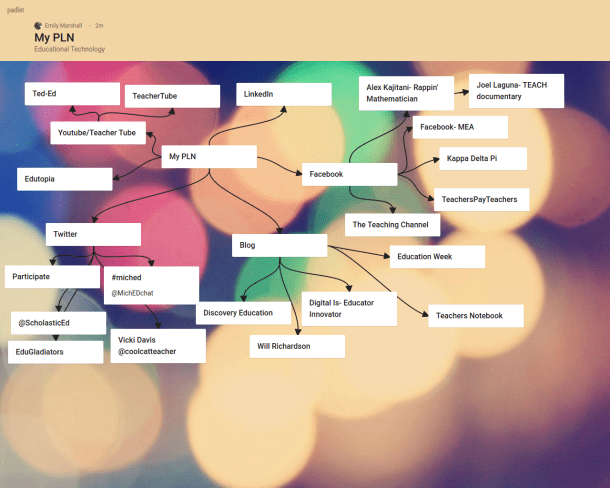
Here’s my PLN plus all my twitter chat groups! I used Padlet to make the concept map, and if you’ve never used Padlet, it’s a great resource!

padlet-zu6pfh8q5sr5.png

Twitter chat groups are one way to build your PLN. My favorites to participate in have been #leadlap, #tlap, #bekindedu, and a new one for me #satchat! There are so many out there, and they can all be found at https://sites.google.com/site/twittereducationchats/education-chat-calendar. I like to use the tool Participate to keep track of all the updates because they can move fast, and there’s no way to read everything and keep up! Chats are always great to go back to later and reread!

Another way to build your PLN is by having multiple platforms to share your ideas! I use Twitter, Instagram, Facebook, this blog, and TeachersPayTeachers. In order to use those platforms to build your PLN, you need to have content to share! This can include pictures, content you make, comments, etc. You can share what is going on in your classroom, the layout of your classroom, fun things you’re doing for your school, or just your ideas! Whatever you are proud of, share it! I like to tell my students, “Say it LOUD and PROUD!” and as teachers, we need to say our things loud and proud when it makes a positive impact on education!

For building content… to share on those platforms… to build your PLN (see it’s all connected!), I like to use programs like Word, Adobe Spark, and Powerpoint. I recently started playing around with Adobe Spark (Teachers and Students get a discount!!) and it’s amazing. Here are some anchor chart posters I made for my room and TPT this week, plus a menu for our room transformation for opinion writing this week! It has pre-made layouts for you, you can play with colors, and insert graphics. It’s an amazing tool for creating not only posters, but also Instagram and Facebook logos, cover photos, and more to help you create your profile to start building your name and PLN!


You can pick up the make it plural for FREE at my store: https://www.teacherspayteachers.com/Store/Teachstation. 

In the end, remember you’re an amazing teacher who has things to share that will help build our community as a whole! If you don’t feel like sharing, then join to read what other people share to learn and grow, as we all should throughout our entire profession! Grow your PLN, grow your name as a teacher, and grow your brain!

Keep rocking at learning,

Emily

Interactive Presentations For Engaged Learners

How many of us played Jeopardy in our classrooms through a PowerPoint presentation? Have you ever done a WebQuest with your students? What if we combined the two?

I’m currently working on designing Powerpoint presentations that can be transferred to Google Slides and accessed by students. Students can click through the presentations, read information online to help them learn, and complete projects.

Screen Shot 2018-07-16 at 7.44.55 PM

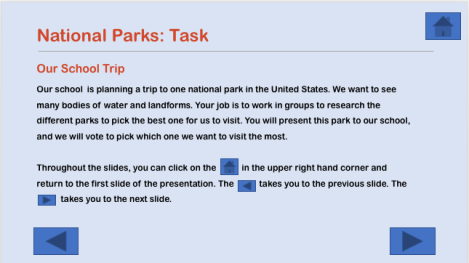
This week I created one for landform models for second grade. Students research national parks with different landforms and pick one they would like the school to visit. The school (or classroom) then votes on which park they would like to visit the most based off their models and a persuasive paragraph about why we should visit the park.  This makes it authentic and gets students motivated. With students being able to click through the slides, the project also promotes independence.

Go to my TPT store to download the free lesson here. If you like it and would like me to create more, comment! Feel free to tell me any topics you’d like to see! Habitats and Matter are on there way! The graphics are by A Hughes Design.

Thanks for visiting,

Emily